People no longer want to spend hours standing in queues or traveling to a bank branch just to perform basic transactions. Instead, they prefer banking solutions that allow them to manage their finances from the comfort of their homes, offices, or even while on the move. This is where Standard Bank Cellphone Banking comes in.
The Cellphone Banking is a service designed to provide customers with quick, secure, and convenient access to their bank accounts using their mobile phones. Whether you need to check your account balance, transfer funds, purchase airtime, pay bills, or view recent transactions, cellphone banking makes it possible without visiting a branch or using a computer.
This article explores everything you need to know about Standard Bank Cellphone Banking, including its features, benefits, registration process, security measures, and tips for making the most of the service.
Read:Absa cellphone banking: How to Register, transfer money and check Balance
Features
Standard Bank Cellphone Banking offers a wide range of features that make everyday banking more convenient.
USSD Cellphone Banking (No Smart Device Required)
By dialing *120*2345 youget instant access to a highly secure, text-based banking menu. It does not require a data plan or internet connection.
-
Check real-time account balances and view basic transaction histories.
-
Perform inter-account transfers, handle once-off or beneficiary payments, and pay registered bills or municipal accounts.
-
Send cash vouchers to anyone with a valid cellphone number. Recipients can withdraw the funds at any Standard Bank ATM or retail partner without needing a bank account.
-
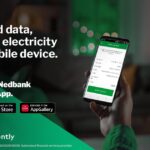
Buy prepaid airtime, data, and electricity. You can also dial
*120*2345#to top up your mobile airtime even if you currently have zero airtime or data balance. -
Access the ‘Manage Debit Orders’ menu directly to reverse unauthorized debit orders securely.
-
Purchase Lotto™ and PowerBall™ tickets directly from your device.
How to Register for Standard Bank Cellphone Banking
To register for standard bank cellphone banking you need to dial *120*2345# or *130*2345# and follow the prompts to register also You will need your card number, pin and ID number handy to register
For easy and simple steps kindly follow the steps below:
- Dial *120*2345# from your cellphone.
- Follow the prompts to enter your ID number and account details.
- Create a secure 5‑digit PIN.
- Once confirmed, you’ll be able to access services immediately.
What You Can Do With It
This is where Standard Bank cellphone banking really earns its keep. The list of things you can do is longer than most people expect.
Check Your Balance and Statements
This is the most common reason people use cellphone banking, and it works seamlessly. You can check your balance in seconds, and on the app, you can view a full transaction history, download statements, Just
1.Dial *120*2345# on your cellphone.
2.Enter your 5‑digit Cellphone Banking PIN.
3.Select “Balance” from the menu.
4.Your available balance will be displayed instantly.
If you have more than one Standard Bank account linked, you can choose which account balance to view.
Transfer Money
You can move money between your own Standard Bank accounts or send it to other people. Transfers to other Standard Bank accounts are usually instant. Transfers to accounts at other banks go through the standard interbank clearing process, which can take a few hours to a business day depending on the time you send.
- Dial *120*2345# on your cellphone.
- Enter your 5‑digit Cellphone Banking PIN.
- Select “Transfer” from the menu.
- Choose whether you’re transferring between your own accounts or to another Standard Bank account.
- Enter the recipient’s account number or cellphone number (for Instant Money).
- Enter the amount you want to transfer.
- Confirm the details and approve the transaction.
- You’ll receive an SMS confirmation once the transfer is complete.
Buy Airtime and Data
Running low on airtime mid-conversation is frustrating. With cellphone banking, you can top up your own number or someone else’s in under a minute. This works across all major networks, and you can buy data bundles too. The amount is debited directly from your bank account, so there’s no need to go looking for a spaza shop or an ATM.
USSD Airtime Purchase
- Dial *130*2345# on your cellphone.
- Enter your 5‑digit Cellphone Banking PIN.
- Select “Airtime” from the menu.
- Choose whether you’re buying for your own number or another number.
- Enter the amount you want to purchase.
- Confirm the transaction.
- You’ll receive an SMS confirmation, and the airtime will load instantly.
Read: How to contact MTN Customer Care
Buy data
USSD Data Purchase
- Dial 1202345#.
- Enter your PIN.
- Select “Data Bundles.”
- Choose your network provider (MTN, Vodacom, Cell C, Telkom).
- Pick the bundle size you want.
- Confirm the purchase.
- You’ll get an SMS confirmation, and the data will be loaded immediately.
Pay for Electricity (Prepaid)
Load shedding or not, you need electricity. Through Standard Bank cellphone banking, you can buy prepaid electricity using your meter number. The token is sent to you via SMS, and you can enter it on your meter straight away. This is one of the features people use most regularly, especially at the end of the month when prepaid meters start beeping. here is the steps
USSD Electricity Purchase
- Dial *120*2345# on your cellphone.
- Enter your 5‑digit Cellphone Banking PIN.
- Select “Electricity” from the menu.
- Enter your meter number (make sure it’s correct).
- Choose the amount of electricity you want to buy.
- Confirm the transaction details.
- You’ll receive an SMS with your electricity token number.
- Enter the token into your prepaid meter to load the units.
Pay Bills and Accounts
You can pay your DStv, gym subscription, municipality account, school fees, and many other billers directly through the app or USSD. The trick is to set up your beneficiaries properly the first time — once they’re saved, future payments are quick. You can also set up recurring payments so things like your rent or insurance get paid automatically on the date you choose. follow the steps below.
USSD Bill Payment
- Dial *120*2345# on your cellphone.
- Enter your 5‑digit Cellphone Banking PIN.
- Select “Payments” from the menu.
- Choose the type of bill you want to pay (e.g., municipal, DStv, Telkom, school fees).
- Enter the account or reference number linked to the bill.
- Enter the amount you want to pay.
- Confirm the transaction details.
- You’ll receive an SMS confirmation once the payment is successful.
Open New Accounts
This one surprises a lot of people. You can actually open certain account types through the app without setting foot in a branch. Standard Bank has made it possible to open savings accounts and some transactional accounts digitally, which is a significant time-saver. You’ll need your South African ID and a few minutes, and the bank takes care of the FICA verification digitally.
- USSD Account Opening
- Dial *120*2345# on your cellphone.
- Enter your 5‑digit Cellphone Banking PIN.
- From the menu, select “Open New Account.”
- Choose the type of account you want to open (e.g., savings, student, or special purpose account).
- Provide the required details such as your ID number and personal information.
- Confirm the information and accept the terms.
- You’ll receive an SMS confirmation with your new account details.
Types of Accounts You Can Open
- Savings Account: For everyday transactions and saving money securely.
- Student Account: Tailored for learners and young adults with low fees.
- Special Purpose Account: For specific needs like business side hustles or family savings.
Read; How To Detect and avoid fake bank alert transfer payment
Apply for Products
Applying for products through Standard Bank Cellphone Banking is one of the most empowering features because it allows customers to access new financial services without needing internet, a smartphone, or visiting a branch. It’s designed to make banking inclusive and convenient.
USSD Application
- Dial *120*2345# on your cellphone.
- Enter your 5‑digit Cellphone Banking PIN.
- From the menu, select “Apply for Products.”
- Choose the product you want to apply for (e.g., loans, insurance, savings).
- Provide the required details such as ID number, income information, or personal details.
- Confirm the application and accept the terms.
- You’ll receive an SMS confirmation, and Standard Bank may follow up with additional verification.
Types of Products You Can Apply For
- Personal Loans: Quick access to funds for emergencies or planned expenses.
- Savings Accounts: Open new accounts to grow your money securely.
- Insurance Products: Apply for funeral cover, life insurance, or other protection plans.
- Credit Products: Request overdraft facilities or credit cards.
- Special Offers: Access promotions or tailored financial solutions.
How to Play Lotto™ and PowerBall™
Here’s how you can play Lotto™ and PowerBall™ using Standard Bank Cellphone Banking. This feature makes it easy to participate in national lotteries without needing to visit a retailer.
USSD Lotto Purchase
- Dial *120*2345# on your cellphone.
- Enter your 5‑digit Cellphone Banking PIN.
- Select “Lotto/PowerBall” from the menu.
- Choose the game you want to play (Lotto or PowerBall).
- Pick your numbers or select “Quick Pick” for random numbers.
- Confirm your ticket purchase.
- You’ll receive an SMS confirmation with your ticket details.
Resetting your PIN on Standard Bank Cellphone Banking is straightforward and designed to keep your account secure if you forget it or suspect it’s compromised. Here’s how you can do it:
USSD PIN Reset
- Dial *120*2345# on your cellphone.
- Select “Forgot PIN” or “Reset PIN” from the menu.
- Enter your South African ID number and account details for verification.
- You’ll receive a One‑Time Password (OTP) via SMS.
- Enter the OTP to confirm your identity.
- Create a new 5‑digit PIN.
- Confirm the new PIN.
- You’ll get an SMS confirmation that your PIN has been successfully reset.
Final Thoughts
Standard Bank cellphone banking has genuinely made everyday banking more accessible. You don’t need to take half a day off work to visit a branch for things that used to require it — balance inquiries, transfers, bill payments, airtime purchases, and more are all within reach from wherever you are.
The USSD option makes it available to people without smartphones or data bundles, which is important in a country with a diverse range of mobile users.

Contact us; Kokobest04@gmail.com
- List of Banks and Credit Unions in the United kingdom - October 8, 2026
- List of Banks and Credit Unions in the United States - October 8, 2026
- Mortgage Preapproval Requirements: What You Need to Qualify - October 8, 2026