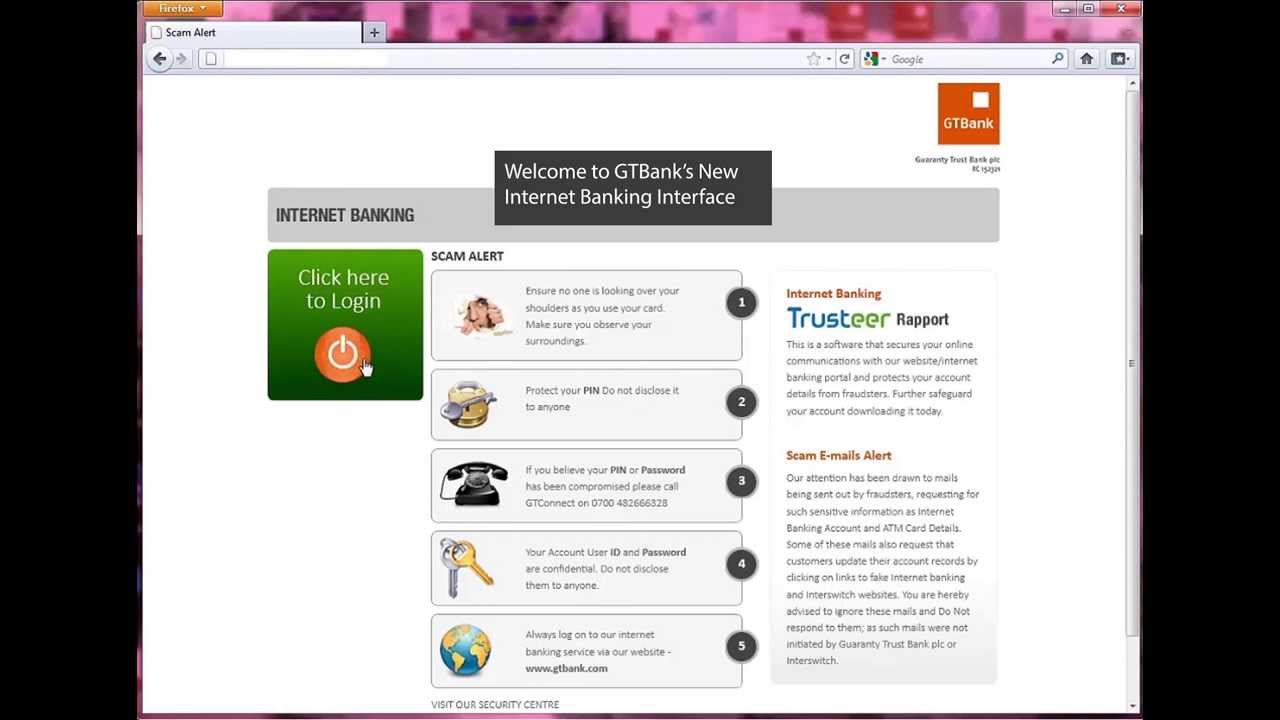
In today’s fast-paced digital era, Guaranty Trust Bank (GTBank) has established itself as one of Africa’s leading financial institutions, and its digital platforms—GTBank Online Banking and the GTWorld Mobile App—are central to its customer experience. These tools are designed to make banking seamless, secure, and accessible anytime, anywhere.
These digital solutions offer a seamless banking experience, allowing users to perform transactions, manage accounts, and access banking services from the comfort of their homes or on the go.
Key Features
- Account Management: View balances, monitor transactions, and download statements.
- Funds Transfer: Send money within GTBank accounts or to other banks.
- Bill Payments: Pay utilities, subscriptions, and services directly online.
- Card Services: Request new cards, block lost ones, and manage card limits.
- Security: Uses multi-factor authentication and secure login protocols.
Benefits
- 24/7 access to banking services.
- Reduces reliance on physical branches.
- Convenient for businesses and individuals managing multiple accounts.
Read: Names and List of California bank and SWIFT codes
How to register for GTBank Online/Internet banking
Here’s a clear, step-by-step guide on how to register for Guaranty Trust Bank (GTBank) Internet/Online Banking if you have a GTBank account in Nigeria:
You must already have:
1. An active GTBank account (savings or current)
2. A valid email address and phone number linked to your bank account
3. Your account number and debit/ATM card details (sometimes needed for verification)
4. BVN (Bank Verification Number) updated with the bank
Option 1: Online Registration
- Visit GTBank’s website: Go to www.gtbank.com.
- Click “Internet Banking”: Select the Sign Up/Register option.
- Provide account details: You’ll need:
- Your GTBank NUBAN account number
- The last 6 digits of your GTBank ATM card
- The expiry date of your ATM card
- Your card PIN
- Submit your request: Once completed, GTBank will send your Internet Banking ID and password to your registered email.
- Login and change password: Use the credentials to log in, then update your password for security.
Option 2: USSD Registration
- Dial 737 65#* from the phone number linked to your GTBank account.
- Follow the prompts to complete registration.
- You’ll receive your login details via email or SMS.
Option 3: Register Through the Bank Branch
If the online form isn’t accessible or you prefer in-person help:
- Visit any GTBank branch near you.
- Ask for a GTBank Internet Banking application form.
- Fill in your details (account number, email, phone, etc.).
- Submit the form to the bank officer.
The bank will activate your online banking profile and issue login details once the application is processed.
GTWorld Mobile App
GTWorld is GTBank’s flagship mobile banking app, available on Google Play and the Apple App Store. It has been redesigned to provide a modern, intuitive experience.
Key Features
- Easy Account Opening: Open an account with a selfie for identity verification.
- Biometric Login: Authenticate with fingerprint, facial recognition, or PIN.
- Quick Transactions: Perform transfers, airtime, and data purchases in just three taps.
- Near Me Transfer: Locate nearby GTWorld users and send money instantly.
- Incognito Mode: Hide balances for privacy.
- Error Reporting: Log dispense errors instantly after ATM transactions.
Benefits
- Fast, user-friendly interface.
- Enhanced security with biometrics.
- Consolidates multiple services (payments, transfers, airtime, data) in one app.
- Designed to adapt to customer preferences and lifestyle.
How to Register for GTWorld
Here’s a step‑by‑step guide to registering for the GTWorld Mobile App so you can start banking on the go:[
Step 1: Download the App
- Go to the Google Play Store (for Android) or the Apple App Store (for iOS).
- Search for GTWorld and download the official app published by GTBank.
Step 2: Launch and Begin Registration
- Open the app after installation.
- Select “Sign Up” or “Register”.
- Enter your GTBank account number.
Step 3: Authenticate Your Identity
- Provide details from your GTBank ATM card (last 6 digits, expiry date, and PIN).
- Alternatively, you can use the Selfie Verification feature to onboard if you’re opening a new account.
Step 4: Create Login Credentials
- Set up a 4‑digit PIN, or enable biometric login (fingerprint or facial recognition).
- You’ll also be asked to link your registered phone number for OTP verification.
Step 5: Start Banking
Once registration is complete, you can:
- Check balances and view transactions.
- Transfer money to GTBank and other banks.
- Pay bills, buy airtime, and purchase data.
- Use features like Incognito Mode (to hide balances) and Near Me Transfer.
How to transfer money with GTWorld Mobile App and online/internet banking
Here’s a practical guide to transferring money using GTWorld Mobile App and GTBank Internet Banking:
Transferring Money with GTWorld Mobile App
- Log in: Open the GTWorld app and sign in using your PIN, fingerprint, or facial recognition.
- Navigate to Transfers: On the dashboard, tap “Transfers” (sometimes labeled “Make Money”).
- Choose Source Account: Select the account you want to debit.
- Enter Recipient Details:
- For GTBank accounts: input the beneficiary’s account number.
- For other banks: select the destination bank and enter the account number.
- Enter Amount: Type in the amount you want to send.
- Confirm Transaction: Review details, then authenticate with your PIN or biometrics.
- Receive Confirmation: You’ll get an instant notification once the transfer is successful.
The app also supports Near Me Transfer, allowing you to send money to nearby GTWorld users without needing account details
Transferring Money with GTBank Internet Banking
- Log in: Visit www.gtbank.com and click Internet Banking. Enter your User ID and password.
- Go to Transfers: From the menu, select Funds Transfer.
- Choose Transfer Type:
- GTBank to GTBank: Enter beneficiary account number.
- GTBank to Other Banks: Select the bank and input account details.
- Enter Amount & Narration: Specify the amount and add a note if needed.
- Authenticate: Confirm with your token code or OTP sent to your registered phone/email.
- Confirmation: A success message appears, and the beneficiary’s account is credited instantly.
Read: GTBank ussd *737#:How to use it for Transaction
How to check GTbank account number via GTWorld Mobile App and online/internet banking
Here’s how you can easily check your GTBank account number using both the GTWorld Mobile App and GTBank Internet Banking:
GTWorld Mobile App
- Log in: Open the GTWorld app and sign in with your PIN, fingerprint, or facial recognition.
- Dashboard View: Your account number is usually displayed right on the home screen under your account name and balance.
- Account Details: If not visible, tap on your account → select “Account Information” → your account number will be shown.
- Alternative Method: You can also go to Profile/Settings → My Accounts to view linked account numbers.
GTBank Internet Banking
- Log in: Visit www.gtbank.com → click Internet Banking → enter your User ID and password.
- Account Summary: Once logged in, your account number is displayed in the Account Summary section alongside your balance.
- Detailed View: Click on the account to see more details, including your account number and transaction history.

Contact us; Kokobest04@gmail.com
- List of Banks and Credit Unions in the United kingdom - October 8, 2026
- List of Banks and Credit Unions in the United States - October 8, 2026
- Mortgage Preapproval Requirements: What You Need to Qualify - October 8, 2026